Engineering Meets Empathy
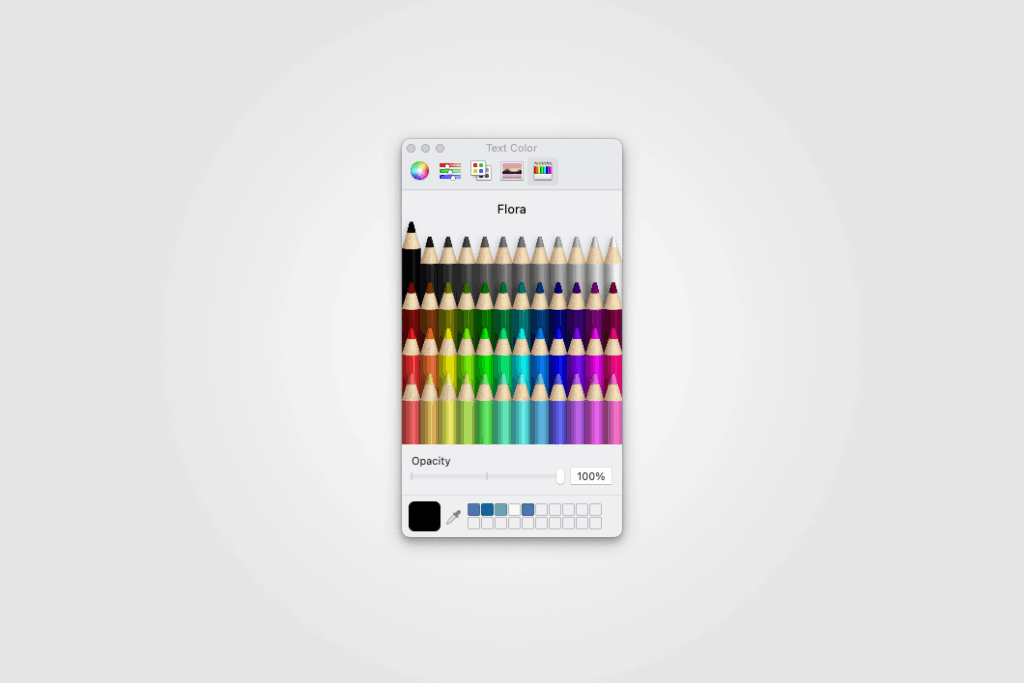
In a fascinating TidBITS article, developer John Calhoun shares how, in the mid-1990s, he added not one but three new color pickers to the Mac OS — HSV, HTML, and crayons — entirely on his own initiative. He recalls:
“a box of crayons is how the rest of us picked colors.”
This wasn’t about technical complexity. It was about user empathy — understanding that not everyone thinks in RGB codes or color wheel angles. Some remember selecting colors from childhood boxes, and Calhoun tapped into that emotional, intuitive memory.
Designing for the Average User
What makes the crayon picker shine is its accessibility. Rather than a set of complex controls, it offers:
- Simple visual selection: Each color is a tile, instantly recognizable.
- Memorable names: Labels like “Scarlet” or “Mango Tango” evoke real-world shades.
- No hidden jargon: No HEX values, no HSL sliders—just colors.
This UI pattern shows how UX can embrace recognizable metaphors to reduce friction. It reminds me of Jakob Nielsen’s heuristic principle: match between system and real world—Calhoun executed that by literally matching digital selection to childhood experience.
When Complexity Overwhelms
Contrast the crayon picker with the other methods:

For designers or coders, this is powerful flexibility. But for a casual user choosing a button color? It’s intimidating.
The crayon palette says:
- “Pick what feels right.”
- “No need to learn specialized terminology.”
- “Trust your eyes, not your head.”
Intentional Trade-Offs
Of course, the crayon model trades precision for usability. You can’t dial an exact HEX match or tweak saturation, but that’s okay—that usability-first mindset ensures:
- Lower cognitive load
- Faster decisions
- A playful, low-stress experience
That’s the very definition of good UX.
UX Lessons From a Playful Picker
As a designer, this story teaches me something powerful:
- Users are diverse – not everyone learns color through color code syntax.
- Simplicity is strategic – denote options with visuals and familiar labels.
- Engineers can lead UX – Calhoun launched this himself, unprompted.
- Joy matters – the crayon picker isn’t just functional; it delights.
A Personal Takeaway
When I’m crafting user interfaces today, I often ask:
- Is my choice of interaction memorable?
- Is it tied to something users recognize?
- Could I swap technical jargon for a friendly metaphor?
- Does it make users feel smart instantly?
Because at the end of the day, UX should feel like… a box of crayons: inviting, playful, and just right.
The crayon picker may seem quaint in today’s era of color wheels and eyedroppers, but its legacy lives on: design empathy, simplicity, and joy—values we can all embrace in crafting interfaces that speak directly to the user, not just the device.
Curious to explore how we might weave that intuitive simplicity into your design work? I’d love to brainstorm—just say the word!