

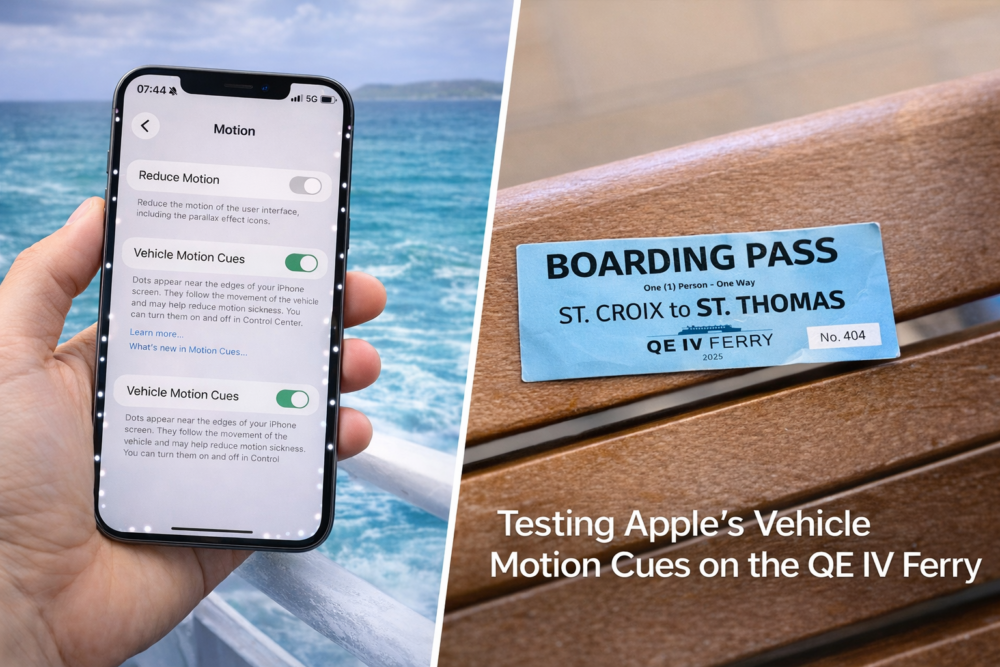
I’m currently sitting at Gallows Bay in Christiansted, St. Croix, waiting to board the QE IV Ferry for the trip over to Blyden Terminal in St. Thomas. While waiting to board, I noticed a relatively new feature in iOS and iPadOS that caught my attention: Vehicle Motion Cues.
Apple designed the feature to help reduce motion sickness when using your phone in moving vehicles. Since I occasionally get a little seasick when looking down at a screen on a ferry, I figured this trip would be a perfect opportunity to test it.
Even though the feature is meant for cars, I’m curious to see how well it works on the ocean.
What “Vehicle Motion Cues” Does
Vehicle Motion Cues is an accessibility feature Apple introduced to help people who feel motion sickness while using their phones in moving vehicles.
When enabled, small animated dots appear near the edges of the screen. These dots move in sync with the motion of the vehicle.
The idea is simple but clever.
Motion sickness often happens when your eyes and inner ear disagree. Your inner ear senses motion, but if you’re staring at a static screen, your brain receives conflicting signals.
Vehicle Motion Cues attempts to solve this by visually representing the movement of the vehicle on the screen itself, helping your brain reconcile what it’s feeling with what it’s seeing.
Where to Find It
You can enable the feature on iPhone or iPad by going to:
Settings → Accessibility → Motion → Vehicle Motion Cues
From there you can set it to:
• Off
• Automatic
• On
When enabled, the dots appear along the edges of the screen and respond to movement.
Testing It on the QE IV Ferry
The ferry ride from St. Croix to St. Thomas typically takes about 90 minutes, depending on conditions. It’s a great trip, but if the seas are rough it’s definitely possible to feel the motion—especially if you’re staring at your phone.
That makes it a perfect real-world test.
My plan is simple:
1. Turn Vehicle Motion Cues ON
2. Use my phone normally during the trip
3. Pay attention to whether it actually reduces the uneasy feeling that sometimes comes from looking at a screen while the boat moves.
Since ferries move differently than cars—with rolling, pitching, and wave motion—it will be interesting to see whether the system still helps.
First Impressions (Before Departure)
Before even boarding, I noticed something interesting.
The dots are very subtle. They sit near the edges of the screen and don’t distract from whatever you’re doing. Apple clearly tried to make them present enough to communicate motion without becoming annoying.
That’s important. If they were too prominent, most people would probably disable the feature immediately.
Why This Is an Interesting Idea
What I like about this feature is that it’s a great example of thoughtful design solving a real problem.
Motion sickness while using phones is incredibly common:
• passengers in cars
• people on buses or trains
• travelers on boats or ferries
And instead of just telling people to “look out the window”, Apple tried to solve the underlying sensory mismatch.
It’s a small feature, but it shows how software design can adapt to human biology.
I’ll Report Back After the Crossing
The QE IV ferry should be boarding shortly, so I’m about to test this feature in the real world on the Caribbean Sea between St. Croix and St. Thomas.
If it actually helps reduce motion sickness while using a phone on a ferry, that would be pretty impressive.
I’ll update this post with how well it works once we arrive in Charlotte Amalie.
After the ferry ride from St. Croix to St. Thomas, I can say the feature actually does help.
While it doesn’t completely eliminate the feeling of motion (especially while sailing in the Caribbean Sea), the subtle animated cues make it noticeably easier to glance at your phone without triggering that immediate sense of disorientation.
Interestingly, it seems to work even on ocean movement, which involves rolling and pitching that is different from a car or train.
For anyone who regularly checks their phone while traveling—especially on ferries, buses, or winding roads—it’s a surprisingly thoughtful feature.