Travel Index Dashboard

The dashboard is designed to visually represent travel-related environmental and experiential metrics in a clean, data-driven interface. It gives users insight into travel indices utilizing AI and charts, maps, and comparative views.

Client: Cornerstone Information Systems, Inc. Date: 09-2025 Services: Design, UI/UX

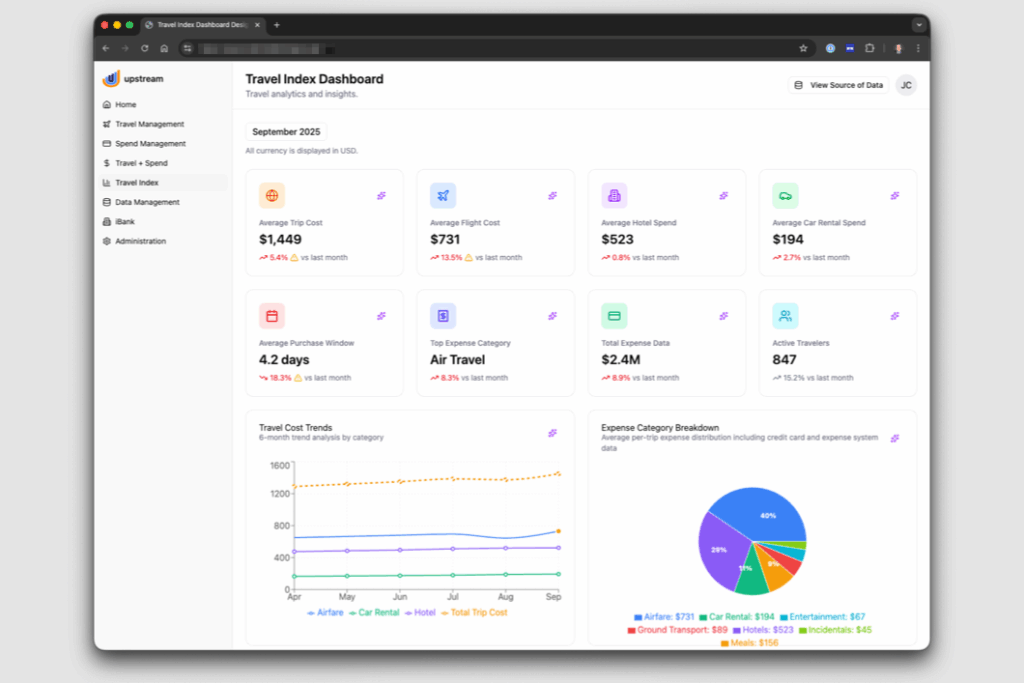
Dashboard view of Upstream’s Travel Index Dashboard for September 2025. It displays travel analytics and insights including: average trip cost $1,449 (up 5.4%), average flight cost $731 (up 13.5%), average hotel spend $523 (up 0.8%), and average car rental spend $194 (up 2.7%). Other metrics include average purchase window 4.2 days (down 18.3%), top expense category air travel (down 8.3%), total expense data $2.4M (down 8.9%), and active travelers 847 (down 15.2%). Below are two charts: a line graph showing 6-month travel cost trends by category (airfare, car rental, hotel, total trip cost) and a pie chart showing expense category breakdown with airfare at 40%, hotel at 29%, meals at 9%, and other smaller categories.

Upstream Travel Index Dashboard with a detail panel open for ‘Average Flight Cost’ in September 2025. The panel highlights that the average flight cost climbed 13.5% to $731, driven by a surge in premium cabin bookings. A yellow warning box notes an anomaly: airfare increased 13.5% in a single month, far higher than the usual 2–3% variance, with a 42% rise in premium bookings. Below, a small line chart shows average flight cost at $731. Explanatory text describes how business and first-class bookings contributed most of the increase, with premium policies adding significant expense, while economy bookings rose less sharply.

Upstream Travel Index Dashboard showing an open panel for ‘Average Purchase Window,’ which is 4.2 days (down 18.3% from last month). A bar chart displays purchase window data. Below, a pop-up titled ‘Automate this Insight’ allows scheduling automated delivery of the metric. Options include Frequency (set to Weekly), Delivery Method (set to Email), and a preview message that reads ‘Send Average Purchase Window Insight weekly via Email.’ Buttons at the bottom offer ‘Cancel’ and ‘Save Automation.’

A web application screen shows the “Travel Index Dashboard” with travel analytics. In the center, a modal titled “Create Event-Driven Action” is open. The form includes fields for “Action Name” (set to “Average Flight Cost Alert”), “Trigger Conditions” (set to “% Change exceeds 10”), and “Actions” (set to “Send Email” to team@company.com and #travel-alerts). The message template says: “Alert: Average Flight Cost has exceeded the threshold by {actual_value}%. Immediate review recommended.” A preview at the bottom confirms the condition: “When % Change exceeds 10%, send email notification to specified recipients.” Two buttons at the bottom read “Cancel” and “Create EDA.”

Upstream Travel Index Dashboard with a modal titled ‘Data Sources.’ It lists connected systems powering the dashboard: Concur Travel & Expense (2,847 records, last sync 2 hours ago), Corporate Credit Cards (1,523 records, last sync 4 hours ago), HR Systems (Workday, 847 records, last sync 1 day ago), Booking Tool (Amadeus, 956 records, last sync 1 hour ago), and GDS Data Feed (3,241 records, last sync 30 minutes ago). Each source shows tags such as Flights, Expenses, Transactions, Employee Data, Reservations, and Fares. A note at the bottom states that all data is aggregated and anonymized, with refreshes every 30 minutes to 4 hours.