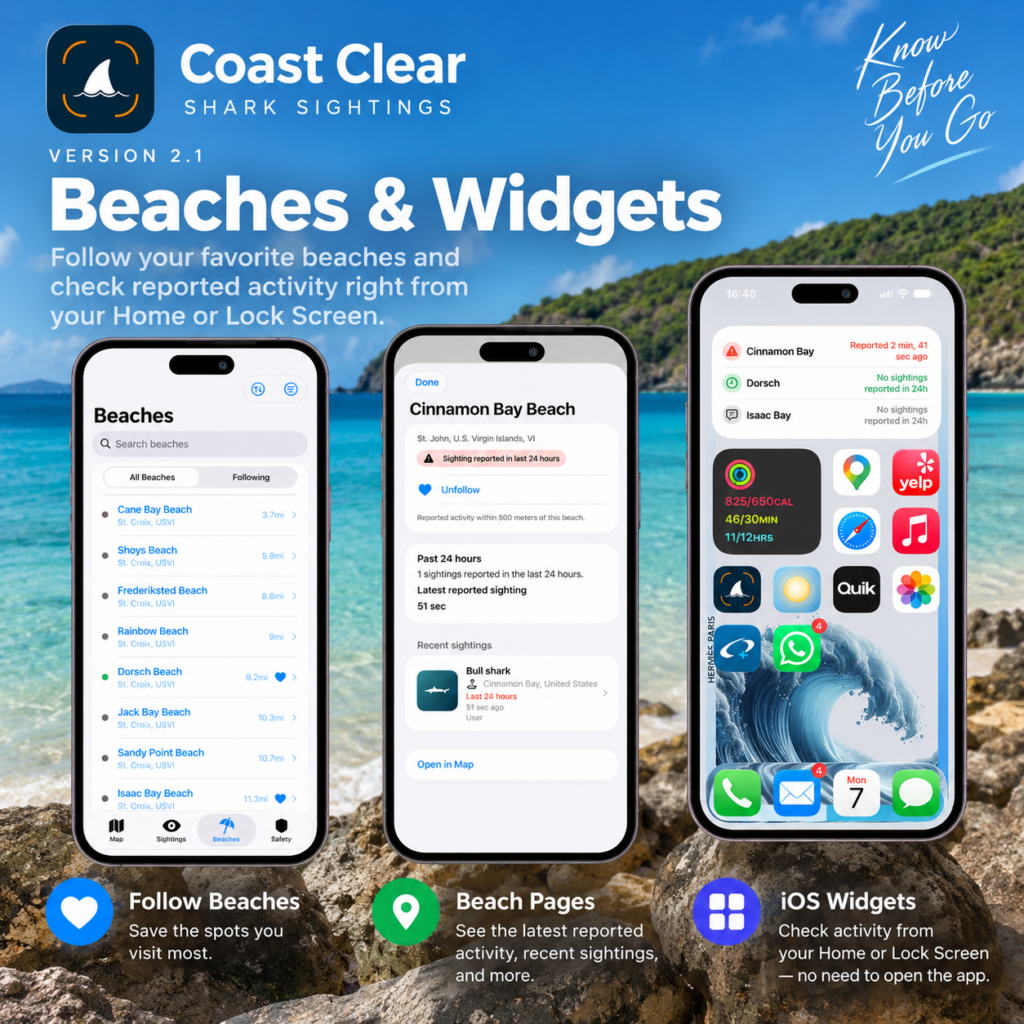
Coast Clear 2.1 is here — introducing Beach Pages, followed beaches, and iOS widgets that make it easier to keep up with reported activity at the places you care about.
When I released Coast Clear 2.0, I described it as a rebuild designed not only to improve the app today, but to create a stronger foundation for what comes next.
Version 2.1 is the first step in building on that foundation.
Until now, Coast Clear has primarily been organized around individual shark sightings and the map. With this update, beaches themselves become an important part of the experience.
Follow the Beaches You Care About
Most of us don’t visit every beach equally.
There are places we return to regularly — whether it’s the beach closest to home, a favorite snorkeling spot, somewhere we swim in the morning, or a beach we visit whenever we get the chance.
With Coast Clear 2.1, you can now follow beaches.
Tap the heart on a beach you care about, and it will appear in the new Following section. That gives you a simple way to keep your regular beaches together instead of searching for them each time you open the app.
It’s a small interaction, but it establishes something important for Coast Clear: the app can begin becoming more relevant to the particular places you care about.
Introducing Beach Pages
Beaches also have their own dedicated pages for the first time.
Open a Beach Page and you’ll be able to see information including:
- The beach and its location
- Whether you’ve followed it
- Reported activity during the past 24 hours
- The most recent reported sighting
- Recent sightings around the beach
- A quick way to view the location on the map
The important word here is reported.
Coast Clear is a community-powered app. It shows information people have reported, not the current location of sharks or a determination that a beach is safe or unsafe.
So if Coast Clear says there have been no sightings reported at a beach in the past 24 hours, that’s exactly what it means: no sightings have been reported to Coast Clear during that period.
Coast Clear Comes to Your Home Screen
One of my favorite additions in 2.1 is something you don’t even have to open Coast Clear to use.
📱 Coast Clear now has iOS widgets.
You can add a widget to your Home Screen and keep an eye on recent reported activity at beaches you follow.
A widget can show activity for a selected beach or give you a quick look across multiple followed beaches.
For example, you might see:
Cinnamon Bay
Sighting reported 2 min agoDorsch
No sightings reported in 24hIsaac Bay
No sightings reported in 24h
It’s intended to answer a simple question at a glance: What’s been reported at the beaches I care about?
Tap a beach from the widget and Coast Clear takes you directly to its Beach Page.
On Your Lock Screen, Too
Coast Clear 2.1 also introduces a Lock Screen widget.
Choose a beach you follow and you can see its latest reported activity without even unlocking your iPhone.
This is exactly the kind of experience I wanted widgets to provide. Coast Clear shouldn’t require opening the app and navigating several screens every time you want a quick update.
Sometimes a glance is enough.
Beaches Are Just the Beginning
Beach Pages in 2.1 are intentionally focused.
They provide recent Coast Clear activity today, but creating beaches as their own part of the app opens up considerably more possibilities for the future.
Over time, I’d like these pages to become more useful sources of information about the beaches themselves — not just individual shark reports.
It also creates a foundation for more personalized Coast Clear experiences. Following a beach can eventually mean more than simply putting it on a list.
That’s one of the things I enjoy most about this update: the features in 2.1 are useful on their own, but they’re also building blocks for what’s coming next.
Growing Beyond the U.S. Virgin Islands
Coast Clear started with a simple idea inspired by life in the U.S. Virgin Islands: give coastal communities an easy way to share and see recent shark sightings around their beaches.
But the idea isn’t limited to the Virgin Islands.
The new beach architecture in Coast Clear is designed with that in mind. As Coast Clear grows, beaches can be added in other coastal communities while keeping the same experience — follow the places you care about, see what’s been reported nearby, and stay informed.
There’s a lot more I want to do here.
Coast Clear 2.1 Is Available Now
If you already have Coast Clear, update to version 2.1 and head to the new Beaches section to start following your favorite beaches.
Then add a Coast Clear widget to your Home Screen or Lock Screen to keep their latest reported activity just a glance away.
You can also learn more about the app on the Coast Clear website.
Thanks for helping keep our coastal communities informed. 🌊🦈