Queue Monitor

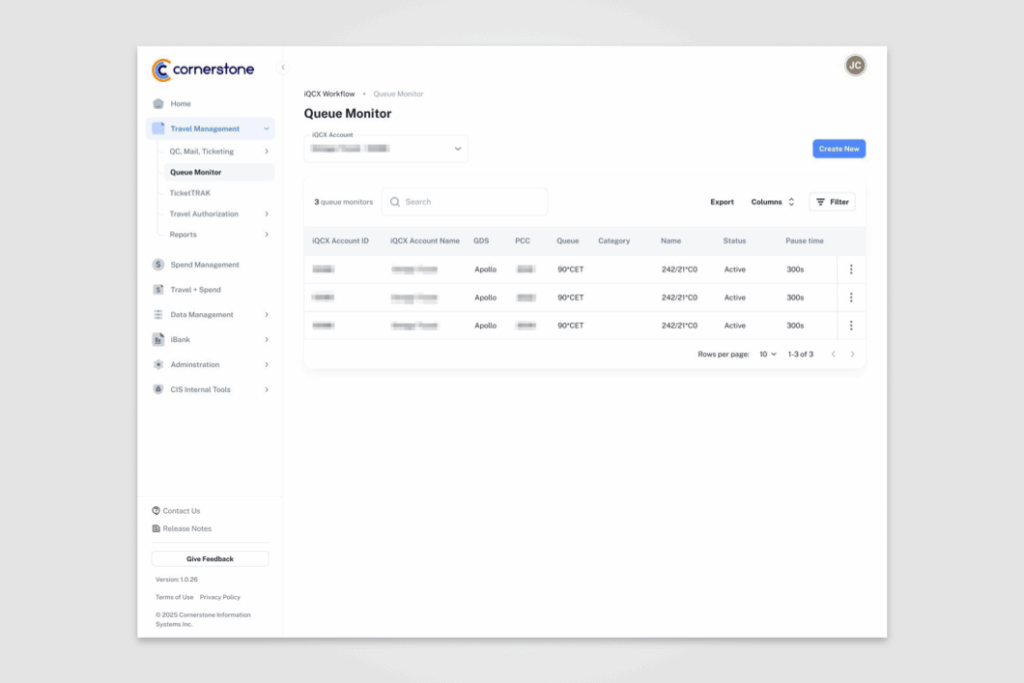
Queue Monitor module provides administrators with a streamlined interface to configure, track, and analyze reservation queues in real time. The design uses a clear data table for queue listings, expandable detail modals for configuration, and visual line charts to track threshold performance and processing frequency. Features such as in-line editing, filtering, and customizable thresholds make it highly functional while maintaining a clean, modern UI consistent with the overall platform design.

Client: Cornerstone Information Systems, Inc. Date: 10-2025 Services: Design, UI/UX.

Queue Monitor dashboard showing a table of active iQCX queue monitors with fields for account ID, GDS, PCC, queue, category, status, and pause time. A search bar, export options, column settings, and filter button appear above the table. A ‘Create New’ button is available in the top right.

Queue Monitor detail modal showing fields for name, GDS, queue type, PCC, queue, threshold, and frequency. A description field explains booking details processing. A line chart below displays queue monitor counts with threshold line and schedule start/end markers.

Queue Monitor detail modal similar to the previous screen but with threshold set to 15. The line chart includes a tooltip highlighting a data point with queue monitor count and date/time.

Queue Monitor creation form with fields for name, description, GDS, PCC, queue, queue type, threshold, and frequency. Form includes a save and cancel button at the bottom.